

Architecture
How CosmicAC's components fit together and connect to your Kubernetes cluster.
CosmicAC is a self-hosted platform that runs GPU workloads on your Kubernetes cluster. Most of its components run outside the cluster. cosmicac-wrk-server-k8s-nvidia reaches the cluster through the Kubernetes API, so you keep operating the cluster while CosmicAC runs workloads on it.
For how each job type runs, see GPU Container architecture and Managed Inference architecture. For deployment steps, see Set up CosmicAC.
Deployment architecture
Setting up your cluster is separate from deploying CosmicAC. You bring a Kubernetes cluster that already has its GPU nodes and KubeVirt configured. The CosmicAC components then connect to that cluster and run your workloads on it.
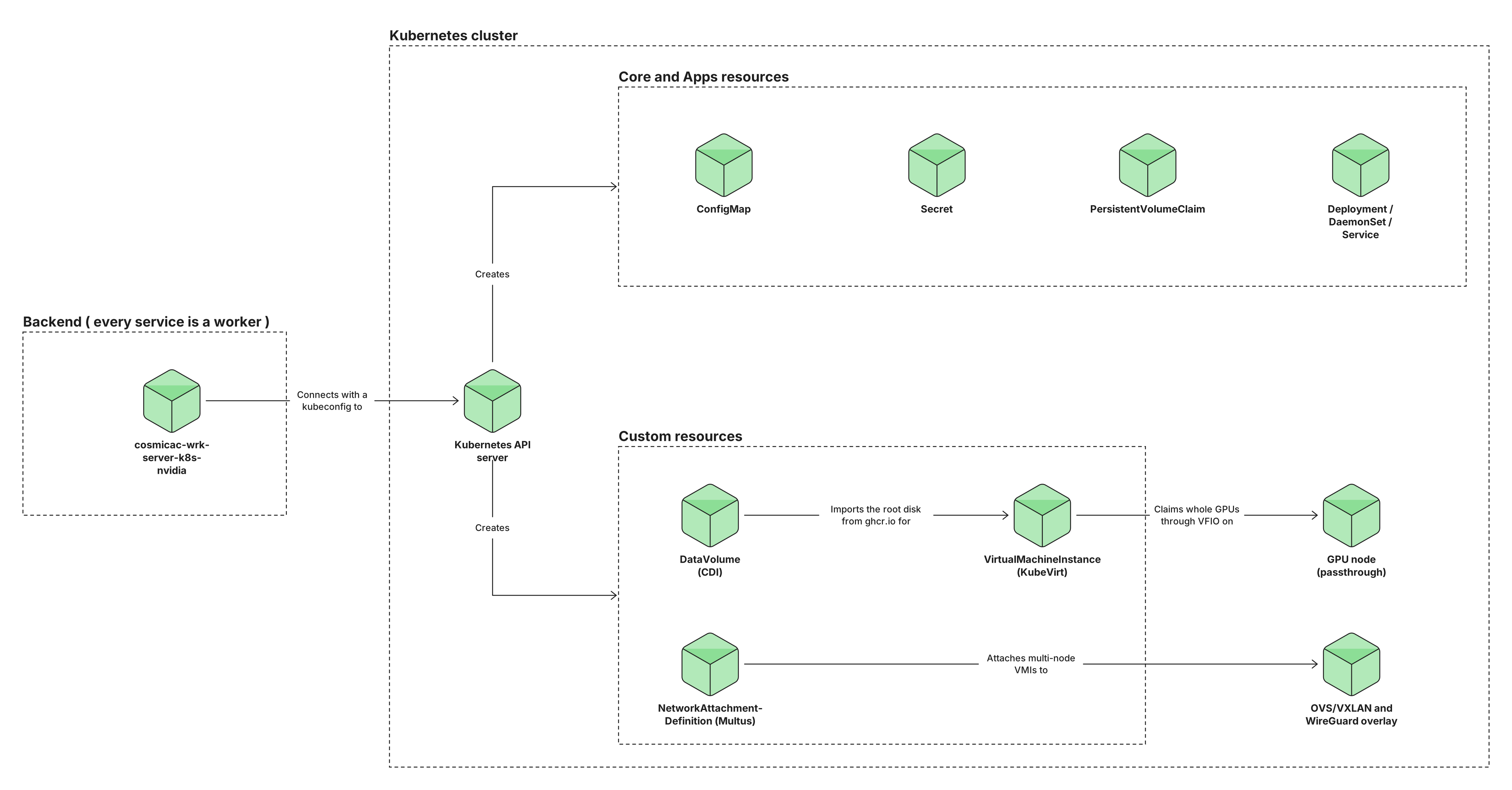
For every workload, CosmicAC provisions a GPU virtual machine instance (VMI), which is a KubeVirt resource. The Containerized Data Importer (CDI) imports the VMI root disk from a registry image. The VMI claims one or more whole GPUs through PCI passthrough, and a multi-node workload also claims InfiniBand.
Your cluster's requirements fall into two tiers.
- Base platform: the Kubernetes, GPU, virtualization, storage, and registry foundation that every workload needs.
- Overlay networking: an add-on tier that connects a workload's nodes over an OVS/VXLAN subcluster, and provides a WireGuard gateway for workloads that need an isolated network.
A multi-node vLLM Managed Inference replica needs the subcluster. See Requirements.
The following diagram shows the Kubernetes resources that cosmicac-wrk-server-k8s-nvidia creates for a job, how the VMI claims its GPUs, and where the overlay network attaches.
Racks, nodes, and GPUs
Your GPU capacity has three nested levels.
- Rack: the GPU capacity behind one worker, listed under a single location. Despite the name, a rack is an entry in your CosmicAC network, not physical hardware. The worker reports the nodes and GPUs of the cluster it connects to, and cosmicac-wrk-ork tracks them as available capacity.
- Node: a machine in your cluster that holds a pool of GPUs. More than one job can run on the same node, each claiming different GPUs from its pool.
- GPU: a single accelerator card, such as an H100. A job claims one or more whole GPUs through passthrough.
A default deployment registers one rack during task bootstrap. To register, list, or remove racks yourself, see Manage racks in your CosmicAC network.
When you create a job, CosmicAC finds a rack in the location that you chose, and then claims GPUs on the nodes in that rack that your team can use. A team that has reserved nodes runs its jobs only on those nodes. For how teams without a reservation use the remaining nodes, see Manage nodes. Every VMI runs inside a Kubernetes pod on a node. Because a node holds a pool of GPUs, one node can host many jobs at once, each in its own pod.
For a Managed Inference Job, the replica GPU count determines how many nodes it takes.
- Single node: the replica's GPU count fits one node, so it runs in a single VMI.
- Multi-node: the replica's GPU count is more than one node holds, so it runs one VMI on each node.
Only a vLLM Managed Inference replica can be multi-node. It takes its nodes from one rack, and each of those nodes contributes the same number of GPUs. CosmicAC joins the replica's VMIs over InfiniBand and an overlay network.
Every other job runs on one node. If you request more GPUs for a GPU Container Job than a node holds, CosmicAC fails the job.
CosmicAC components
Most CosmicAC components run on your host machine, outside your Kubernetes cluster. cosmicac-cli runs on your workstation, and the job agents, cosmicac-wrk-agent-instance and cosmicac-wrk-agent-inference, run inside each job's VMI.
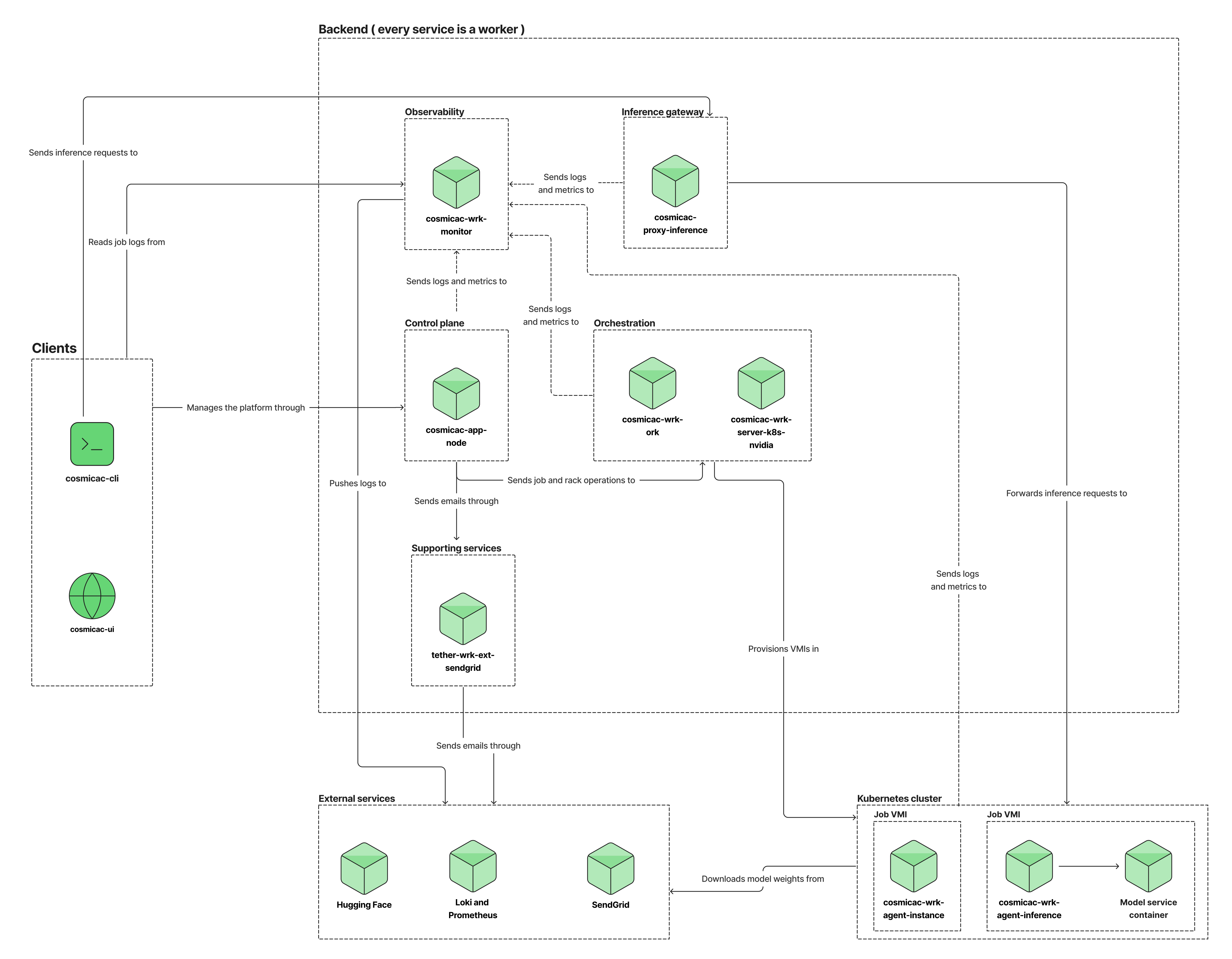
The following diagrams show how the components connect. The overview shows the whole system, and each diagram after it covers one part.
Overview
The overview shows each group of components and the main flows between them.
Control plane and orchestration
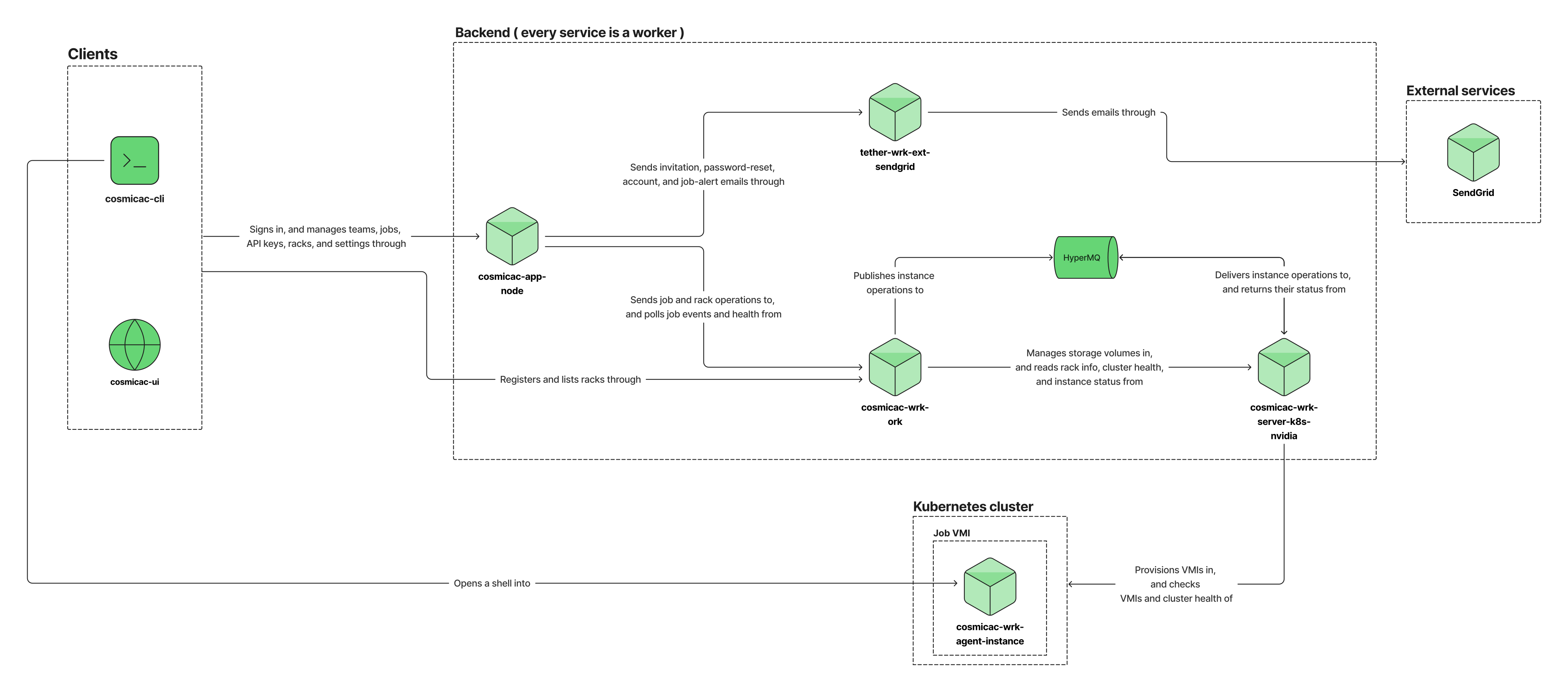
When you create, restart, or delete a job in cosmicac-ui or cosmicac-cli, the request goes to cosmicac-app-node, which sends it to cosmicac-wrk-ork. cosmicac-wrk-ork publishes the operation to HyperMQ. cosmicac-wrk-server-k8s-nvidia picks up the operation from HyperMQ and creates, restarts, or deletes the job's VMIs in your cluster.
Inference
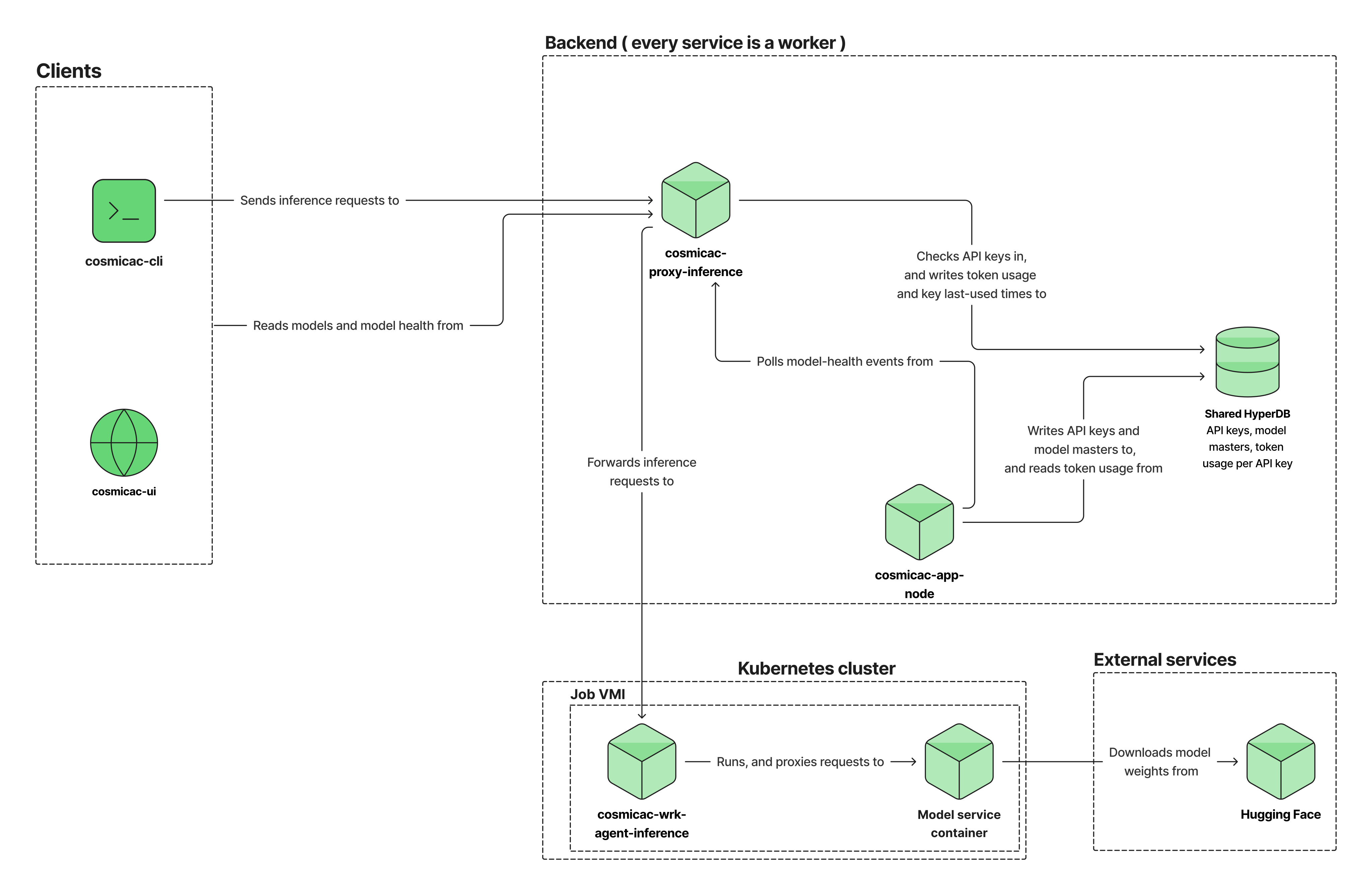
cosmicac-cli sends an inference request to cosmicac-proxy-inference, which checks the API key and forwards the request to cosmicac-wrk-agent-inference in the job's VMI. cosmicac-wrk-agent-inference passes the request to the model service, which is the vLLM or Parakeet server that runs the job's model. cosmicac-wrk-agent-inference and the model service each run as a Docker container in the VMI. cosmicac-proxy-inference records the token usage. cosmicac-app-node and cosmicac-proxy-inference share a HyperDB that holds API keys, model masters, and token usage.
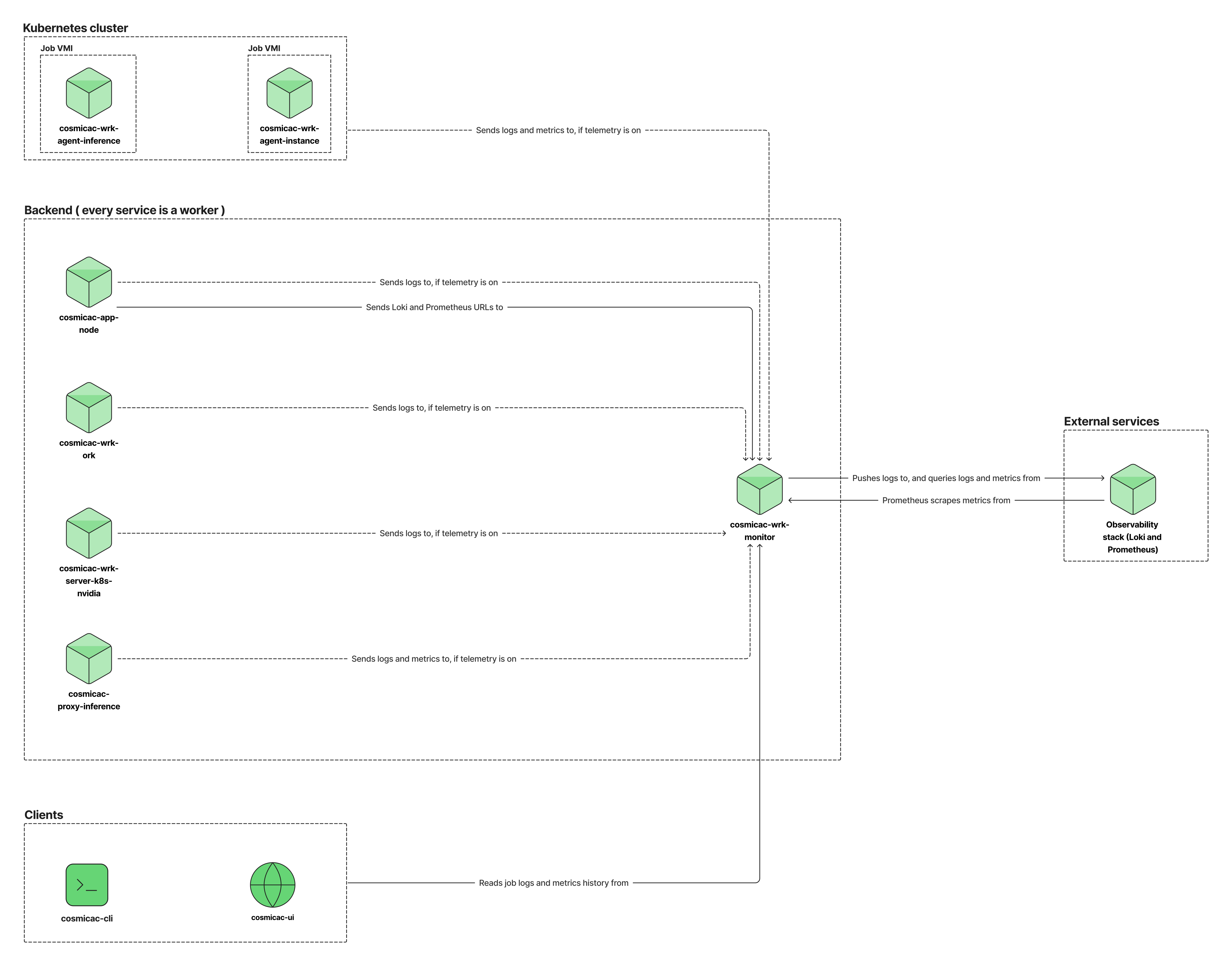
Observability
When telemetry is on, cosmicac-app-node, cosmicac-wrk-ork, cosmicac-wrk-server-k8s-nvidia, cosmicac-proxy-inference, and the job agents send their logs to cosmicac-wrk-monitor. cosmicac-proxy-inference and the job agents also send metrics. cosmicac-wrk-monitor pushes the logs to your Loki, and your Prometheus scrapes the metrics from cosmicac-wrk-monitor. cosmicac-app-node sends cosmicac-wrk-monitor the URLs of your Loki and Prometheus.
Data stores
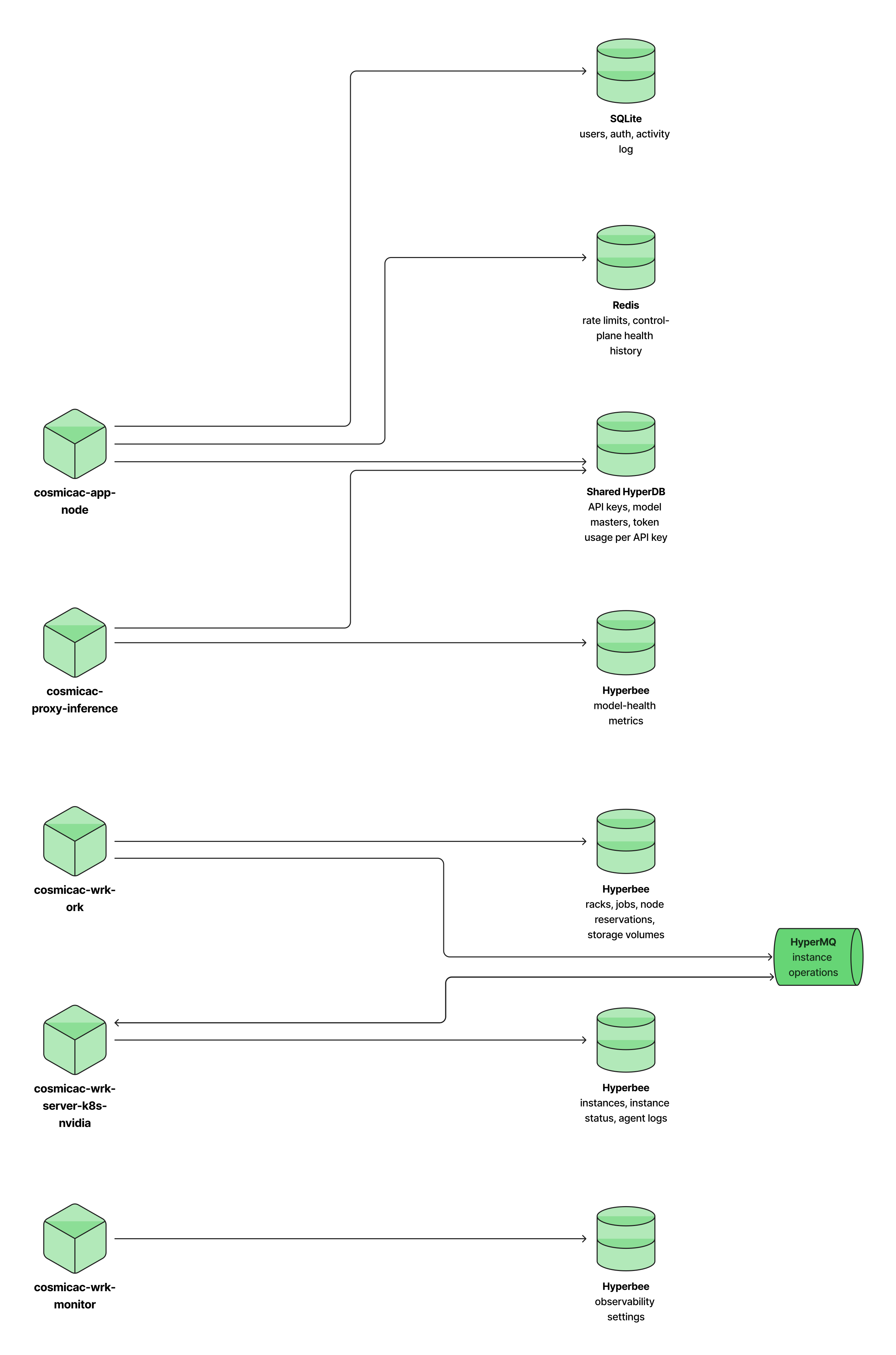
Most components keep their own data. The exception is a HyperDB that cosmicac-app-node and cosmicac-proxy-inference share. HyperMQ, a message queue, carries instance operations from cosmicac-wrk-ork to cosmicac-wrk-server-k8s-nvidia.
The shared HyperDB runs on Autobase, which merges the writes from more than one writer into one database. cosmicac-app-node and cosmicac-proxy-inference each keep a copy and replicate it to each other over Hyperswarm. Each one writes different data:
- cosmicac-app-node writes API keys and model masters.
- cosmicac-proxy-inference writes token usage and the time that each API key was last used.
cosmicac-app-node creates the Autobase. task bootstrap then connects cosmicac-proxy-inference to it in two steps:
task wirewrites the Autobase bootstrap key toPROXY_AUTOBASE_KEY, which cosmicac-proxy-inference uses to join.task autobase-connectregisters cosmicac-proxy-inference as a writer.
Until task autobase-connect succeeds, cosmicac-proxy-inference can't write to the shared HyperDB. If it fails during bootstrap, run task autobase-connect again after the services start.
| Component | Runs on | What it does |
|---|---|---|
| cosmicac-ui | Host machine | Web interface for creating and managing jobs in a browser. |
| cosmicac-cli | Your workstation | Command-line interface that creates and manages jobs, sends inference requests, and opens shell sessions into GPU Container Jobs. |
| cosmicac-app-node | Host machine | App server that serves the HTTP API, authenticates requests, and sends job and rack operations to cosmicac-wrk-ork. |
| cosmicac-wrk-ork | Host machine | Orchestrator that tracks racks and their GPU capacity, places each job on a rack, and publishes instance operations to HyperMQ for cosmicac-wrk-server-k8s-nvidia. |
| cosmicac-wrk-server-k8s-nvidia | Host machine | Server worker that connects to your cluster's Kubernetes API and creates, restarts, and deletes the job VMIs. |
| cosmicac-proxy-inference | Host machine | Inference proxy that authenticates Managed Inference requests, sends them to the job's cosmicac-wrk-agent-inference agents in round-robin order, and records token usage. |
| cosmicac-wrk-agent-instance | Docker container in the job's VMI | Per-job agent that accepts shell sessions into a GPU Container Job over hyperswarm-ssh. |
| cosmicac-wrk-agent-inference | Docker container in the job's VMI | Per-job agent that starts the model service container, passes inference requests to it, and announces itself on the distributed hash table (DHT) so that cosmicac-proxy-inference can find it. |
| cosmicac-wrk-monitor | Host machine | Observability aggregator that collects logs and metrics from the CosmicAC services and job agents, pushes logs to your Loki, and exposes metrics for your Prometheus to scrape. |
| tether-wrk-ext-sendgrid | Host machine | Worker that sends the emails of cosmicac-app-node through SendGrid. Team invitations and password resets depend on it. |
| redis | Host machine | In-memory data store that cosmicac-app-node uses for rate limits and control-plane health history. It writes its data to disk, so the data survives a restart. |
| caddy | Host machine | Web entry point on port 5173 that serves cosmicac-ui and reverse-proxies API, inference, and monitor traffic. |
Caddy proxies /api to cosmicac-app-node, /inference to cosmicac-proxy-inference, and /monitor to cosmicac-wrk-monitor. Every other path serves the web interface.
Holepunch stack
Behind Caddy, the CosmicAC components connect to each other over the Holepunch peer-to-peer stack. Each component connects directly to the components it needs, so internal traffic doesn't pass through a central broker.
| Technology | Used by | What it carries |
|---|---|---|
| Hyperswarm | Every CosmicAC component except cosmicac-ui | Peer discovery and direct connections between components. |
| hyperswarm-rpc | cosmicac-app-node and the workers | Internal RPC calls along the control path. |
| hyperswarm-ssh | cosmicac-cli and cosmicac-wrk-agent-instance | Shell sessions into a running GPU Container Job. |
| HRPC + Hyperswarm | cosmicac-proxy-inference and cosmicac-wrk-agent-inference | Inference requests and the responses that the model service streams back. |
| DHT | cosmicac-wrk-agent-inference and cosmicac-proxy-inference | The location of each cosmicac-wrk-agent-inference. The agent announces itself on a topic, and cosmicac-proxy-inference looks up that topic. |
| HyperDB + Autobase | cosmicac-app-node and cosmicac-proxy-inference | The shared HyperDB of API keys, model masters, and token usage. See Data stores. |
| HyperMQ | cosmicac-wrk-ork and cosmicac-wrk-server-k8s-nvidia | Instance operations, and the status updates that come back for them. |
Some cluster networks block those direct connections. On those networks, the job agents connect through a relay instead. See Set up a relay for CosmicAC.